
Table of Contents
- Introduction
- Quick Summary: Google Business Profile Optimization
- Why Local SEO Stakes Have Changed in 2026: Ask Maps
- Tier 1: Essential Google Business Profile Optimizations
- Tier 2: Strategies for Boosting Local Conversions
- Tier 3: Oversold Local SEO Tactics
- Common Google Business Profile Mistakes to Avoid
- Conclusion
Introduction
Effective Google Business Profile optimization is the difference between an invisible listing and one that consistently drives local traffic. If you have already claimed your Google Business Profile, filled in your hours and address, and uploaded a few photos, you have done the setup work. So why are you still not showing up in the map pack, and why do calls and messages from the profile feel inconsistent?
The problem is rarely a lack of effort; it is usually effort spent on the wrong things. Most guides to Google Business Profile treat every feature as equally important, which leaves small business owners with a long checklist and no sense of what to do first. This article takes a different approach: it ranks the work by how much it actually affects visibility and conversions, and it is honest about the tactics that get more attention than they deserve.
Quick Summary: Google Business Profile Optimization
If you only have an hour, spend it here: get your primary category exactly right, make sure your name, address, and phone number match everywhere they appear online, complete your verification properly, and fill in every relevant service and attribute in detail. Those four things carry more weight than anything else on your profile.
Photos, review generation and responses, and messaging or booking links come next. They will not fix a wrong category, but they convert the visibility you already have.
Posts and the newer AI-driven Q&A feature are worth doing, but they are widely oversold. Posts mainly affect click-through, not ranking. The old Q&A section has been phased out in favour of an AI feature that answers customer questions automatically, and understanding how it works matters more than trying to manage it directly.
Why Local SEO Stakes Have Changed in 2026: Ask Maps
Local ranking still runs on the same foundation Google has used for years: relevance, distance, and prominence. What has changed is what happens after a business earns visibility.
In March 2026, Google introduced Ask Maps, a Gemini-powered feature built into Google Maps. Instead of typing a short keyword like “plumber near me,” a user can ask a full question, such as which nearby restaurant has outdoor seating and is open after ten o’clock. Gemini reads the business’s profile, reviews, photos, services, and website to decide whether to recommend it, and gives a conversational answer rather than a plain list of results.
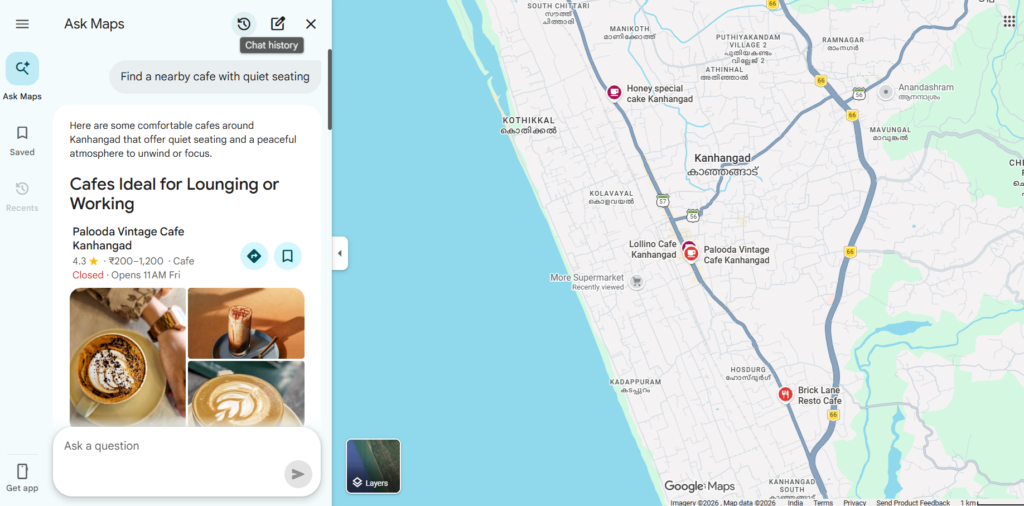
This replaces the old manual Q&A section, where a customer would post a question and wait for the owner or another user to reply. Google had already begun retiring the Q&A API in late 2025, and Ask Maps is the feature that took its place.
The practical effect for a small business is straightforward. Your profile is no longer just something a human scans for information; it is now the raw material an AI system reads to decide whether you get mentioned at all. A profile with vague service descriptions and no attributes filled in gives Gemini very little to work with, even if the business itself would be a great fit for the question asked.
These are the changes with the most direct effect on whether your business shows up at all. If you have not touched them recently, start here before anything else on this list.
Essential Google Business Profile Optimizations
Get Your Primary Category Right
Your primary category is one of the strongest ranking levers available, and it is also one of the most commonly mishandled. A generic category such as “Law Firm” competes with every law firm in the area. A precise one, such as “Personal Injury Attorney,” puts you in front of people searching for exactly that service.
Need help finding your exact category? You must choose from Google’s predefined list of categories rather than typing custom text. Review the official Google Category Guidelines to learn how primary categories influence local rankings, or search the complete database of 4,000+ options using the PlePer GBP Category Lookup Tool to identify the narrowest match for your niche.
Keep Your Name, Address, and Phone Number (NAP) Consistent
Your business name, address, and phone number need to match exactly across your website, your profile, and any directories you appear in. Inconsistencies, even small ones like a suite number formatted differently, create trust problems for Google’s systems and can suppress visibility.
This matters even more if your business has moved. Editing an existing profile’s address after a relocation often does not work the way owners expect. Google can retain the original verified address in its records even when it is hidden from public view, which means the profile can continue to rank as though it were still at the old location. The safer path for a relocated business is usually to verify a new listing at the new address, update the website and contact details first, and ask Google Support to mark the old profile as closed or moved rather than editing it in place.
Verify Properly (and Treat It as an Ongoing Requirement)
Verification is what unlocks full editing control and signals legitimacy to Google’s systems. Video verification, where you record a continuous walkthrough showing signage, the interior, and a live action such as opening the dashboard, has become the standard method for new listings in many regions. Treat the recording seriously, as a rushed or unclear video is a common reason verification gets rejected or delayed.
Fill in Every Relevant Detail With Real Specificity
Profile completeness now carries more weight than it did even a couple of years ago, partly because of Ask Maps. Vague service labels like “Haircut” or “Tax Filing” give an AI system very little to match against a specific customer question. A more detailed description gives both human readers and Gemini something concrete to work with.
The same applies to attributes. Google groups these into sets such as service details (outdoor seating, free Wi-Fi, parking), accessibility (wheelchair access, accessible restrooms), and identity attributes (women-owned, veteran-owned). Go through every attribute available for your category and enable the ones that genuinely apply.
Once the fundamentals above are solid, these are the actions that turn visibility into actual calls, messages, and bookings.
Strategies for Boosting Local Conversions
Optimize Photos and Media
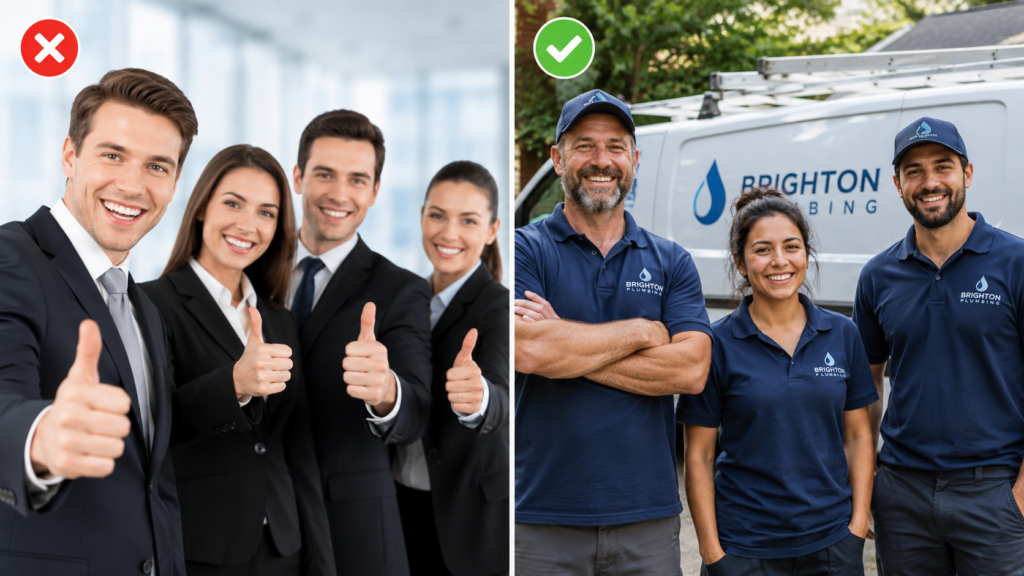
Photos affect how a profile is perceived at a glance, and they contribute to the material Gemini can draw on when answering a conversational query. Prioritize current, accurate photos of the actual location, team, and work over stock imagery. Update them periodically rather than uploading a batch once and leaving them untouched for years.
Leverage Reviews and Reputation Management
Reviews do more than build trust with a browsing customer. Gemini reads review content directly to understand what a business is actually like, not only its star rating. A steady flow of specific, recent reviews, and thoughtful responses to them, feeds both the human reader and the AI system evaluating whether to recommend you.
Ask satisfied customers for reviews as a normal part of doing business. Respond to reviews, including negative ones, with specific and professional replies. A generic response adds little; a reply that references the actual issue and how it was handled is more useful to future readers and to Gemini alike.
Enable Messaging and Booking Links
Profiles that let a customer take action directly, through messaging or a connected booking provider, remove a step between interest and conversion. If your business uses a supported booking tool, connect it. If not, keep messaging enabled and respond promptly, since response time and rate are visible signals of an active, reliable business.
This is where most competing guides give confident advice that does not hold up. Two features get a disproportionate amount of attention relative to what they actually do.
Oversold Local SEO Tactics
Google Posts
Publishing Posts can lift click-through rates within the local panel. It is a reasonable habit if you have something genuinely worth announcing, but it does not directly move your position in the local pack. Treat Posts as a light engagement tool, not a ranking strategy, and do not feel obligated to post on a strict schedule just to satisfy an assumed algorithm requirement.
Q&A and the Shift to Ask Maps
The manual Q&A feature is being phased out in favour of Ask Maps. You are no longer writing answers for a person to read directly; you are ensuring your profile, website, and reviews contain enough accurate, specific detail for Gemini to construct a correct answer on your behalf.
If you check your dashboard and see an AI-suggested business description, review it carefully rather than accepting it automatically. It is generated from available information and can miss details that matter, such as a specific specialism or a genuine point of difference.
- Assuming Posts or Q&A activity will move your ranking position.
- Editing an existing profile’s address after a business relocation instead of verifying a new listing at the new address.
- Choosing a broad category for search volume rather than an accurate, narrow one that matches what the business actually does.
- Leaving an AI-generated description or suggested edit unreviewed.
- Treating the profile as a one-time setup task rather than something that needs periodic attention, particularly around review responses and service descriptions.
Common Google Business Profile Mistakes to Avoid
If you can only act on one section of this article today, work through this list in order:
- Confirm your primary category is the narrowest one that accurately describes your main service.
- Check that your name, address, and phone number match exactly across your website and profile.
- Review your attributes and enable every one that genuinely applies.
- Rewrite at least your top three service descriptions with real detail instead of a bare label.
- Reply to your three most recent reviews with specific, non-generic responses.
Need Help Optimizing Your Google Profile?
Let our local SEO experts audit your listing and build a tailored growth strategy to get you into the top map pack.
Conclusion
Google Business Profile optimization is not about doing more; it is about doing the few things that actually determine visibility before spending time on the things that only feel productive. The businesses that will struggle in 2026 are not the ones posting infrequently; they are the ones whose profiles give Google’s systems, human or AI, too little accurate information to recommend them with confidence. Get the category, consistency, verification, and detail right first.